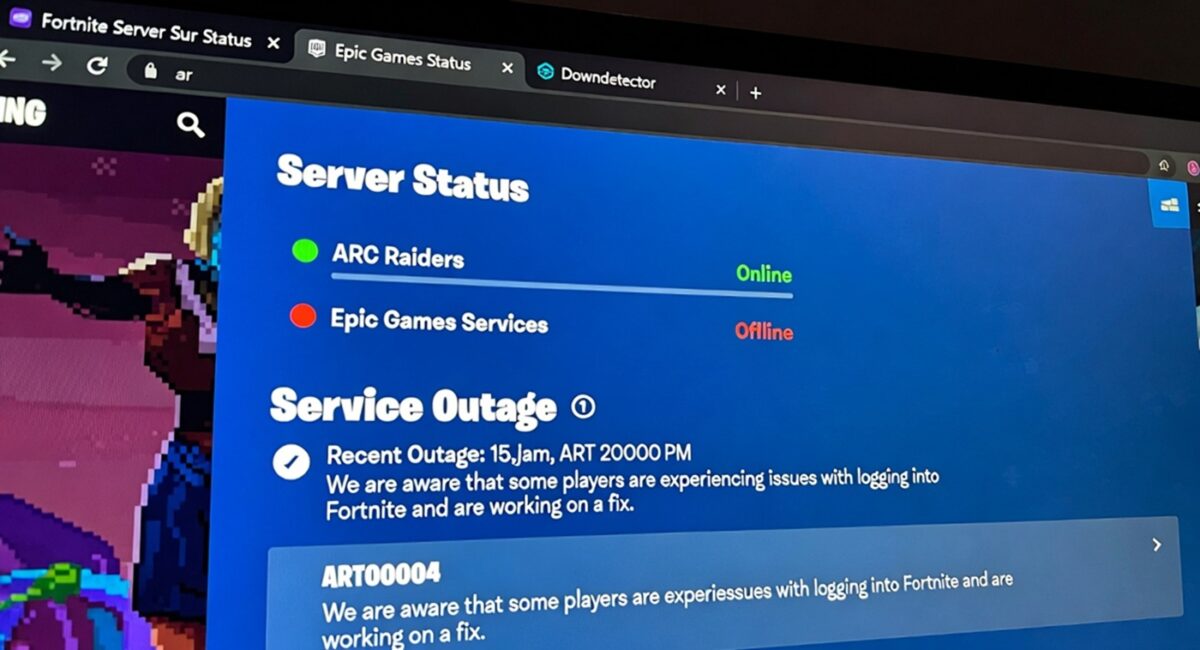
Yes — as of Christmas Day 2025 (Dec 25), players are reporting Fortnite and ARC Raiders (as well as Rocket League, Fall Guys, and other Epic Games titles) being down or disrupted, with login failures, matchmaking issues, and the network timeout error code ART00004 appearing across platforms. This widespread outage, confirmed by outage trackers and community reports, stems from backend authentication and server congestion issues affecting Epic Online Services (EOS) rather than a confirmed Amazon Web Services (AWS) infrastructure failure. Players on PC, PlayStation, Xbox, Switch, and more are experiencing connection problems, with tens of thousands of reports logged on Downdetector and social platforms.
Current Fortnite Server Status — Are the Servers Down?
Widespread Login & Matchmaking Failures
On December 25, 2025, Fortnite experienced a major outage that affected login, authentication, and matchmaking services — leaving players unable to join matches or even access the game menus. This impacted multiple platforms, including PS5, Xbox Series X/S, PC, Nintendo Switch, and mobile devices.
The typical messages reported by users include:
- “Servers Not Responding”
- “An error occurred while connecting to Epic Servers”
- Failures to join matches even after successful login attempts
Community forums and outage trackers have shown consistent spikes in reports during peak times.
ARC Raiders Server Status — What’s Going On?
Massive Outage and ART00004 Error Codes
ARC Raiders, the extraction shooter from Embark Studios, is also facing heavy disruptions. Players are reporting multiple connection issues — most notably the ART00004 network timeout error (“Retrieving data from backend services timed out – please try again later”). This error appears during login and matchmaking attempts, effectively blocking access to the game servers.
According to outage-tracking data:
- ARC Raiders saw reports peaking into the hundreds of thousands of affected players on Dec 25, with more than 346,000 active players impacted at one point amid server connection failures.
- Downdetector and other trackers showed sustained reporting throughout Christmas Day, with login queues, disconnections, and frozen matchmaking across regions.
What’s Causing These Outages? Debunking AWS Myth
Epic Online Services vs. AWS Infrastructure
A lot of speculation circulated on social media that Amazon Web Services (AWS) was down and causing the gaming outages. However, AWS has publicly denied any major service disruption on that day, clarifying that its systems were functioning normally and that social media claims were inaccurate. The official AWS Health Dashboard remained clear for core services.
So what’s really happening?
The most credible reports point to issues with Epic Online Services (EOS) — the shared backend that handles authentication, matchmaking, and player services for Fortnite, ARC Raiders, Rocket League, and other Epic titles. When this shared infrastructure falters, it can ripple across multiple games simultaneously.
Why Is the Outage Worse on Christmas Day?
Holiday Traffic Surge + Backend Strain
The holiday period naturally brings surges in player load — more people off work and school means more simultaneous connections. For ARC Raiders, this year’s Cold Snap update (released Dec 16, 2025) also added new game mechanics and events that demand extra backend resources. When that combines with high holiday traffic, server authentication systems can become overwhelmed, leading to the ART00004 network timeout and similar errors.
In my experience covering major online game outages, holiday spikes can easily expose weak points in shared infrastructure — especially when multiple major titles rely on the same backend services.
Common Error Codes Explained
ART00004 — Network Timeout Error
This is the most reported error for ARC Raiders during this outage. It occurs when the game fails to complete the server handshake due to backend timeout or congestion, not because of a client-side ban or account restriction. Players have described it simply as “stuck at loading, then timeout” on both consoles and PC.
“Servers Not Responding” and Connection Errors
In Fortnite, players often see generic connection failure messages like:
- “Servers Not Responding”
- Login loop failures
- Matchmaking freezes
These messages stem from the same root problem — inability to complete the authentication and game server allocation process, linked back to EOS outages.
How to Check If Fortnite or ARC Raiders Are Down Right Now
- Official Status Page:
Visit status.epicgames.com — this is the authoritative source for current server health across all Epic Games services. - Downdetector:
Check user-submitted outage data in real time for Fortnite, ARC Raiders, and related services to see trends and reporting spikes. - Social Channels:
Follow @ARCRaidersGame and @FortniteStatus on X (formerly Twitter) for official updates, announcements, and developer acknowledgments.
These sources give real-time insight and minimize reliance on social speculation during wide outages.
How to Fix the ART00004 Error and Fortnite Timeouts
Local Troubleshooting Steps
Even though these outages are largely server-side, you can try a few things that sometimes help when connectivity glitches:
1. Restart the Game & Launcher
Fully close Fortnite or ARC Raiders, then relaunch via Epic Games Launcher or Steam — this resets session tokens and can clear temporary timeout loops.
2. Power-Cycle Your Internet
Unplug your router/modem for about 30–60 seconds, then reconnect. This clears local cache and can improve routing to game services.
3. Switch to Wired (Ethernet)
If you’re on Wi-Fi, try a wired connection. Wireless instability can exacerbate timeout errors.
4. Avoid VPN/Proxy Services
These sometimes interfere with authentication routes, leading to timeouts. Disconnect them temporarily if you’re using one.
5. Verify Game Files (PC)
On Steam (for ARC Raiders) or the Epic Launcher, use the Verify Integrity tool to ensure none of your local game files are corrupted.
6. Patience Is Key
When the root cause is server overload or authentication failure, local fixes can only do so much — often the only solution is waiting for the backend to stabilize.
What Developers and Platforms Are Saying
As of this writing:
- Epic Games has acknowledged “active investigations” into service issues affecting login and matchmaking, and cards like Rocket League have also been impacted, not just Fortnite or ARC Raiders.
- Embark Studios (ARC Raiders) is aware of connection complaints and players are watching official channels for status updates.
- AWS has denied any broad outage, meaning the cause is more likely tied to Epic’s authentication services or another backend layer.
Developers typically update status pages and X accounts first, so checking those remains the best near-real-time approach during holidays.
Conclusion: Down Now, Up When Repaired
Yes — Fortnite and ARC Raiders (alongside other Epic titles) are experiencing server problems right now on Christmas Day 2025, with failures spanning login, matchmaking, and backend connectivity. The ART00004 network timeout error is symptomatic of server-side timeouts and authentication issues during a period of extreme load — not individual account bans or device faults. While AWS speculation swirled, AWS itself denies a platform outage, pointing back to Epic’s internal infrastructure.
What you can do:
- Monitor status.epicgames.com and official game socials.
- Try local steps like restarting launchers or power-cycling your router.
- Mostly: wait for Epic and Embark to restore services, especially during heavy holiday traffic.
Stay patient — as frustrating as it is to miss out on holiday gaming, services usually recover once backend authentication systems are stabilized, often within a few hours during peak outages.